Pipedrive integrations: four routes and when to use each
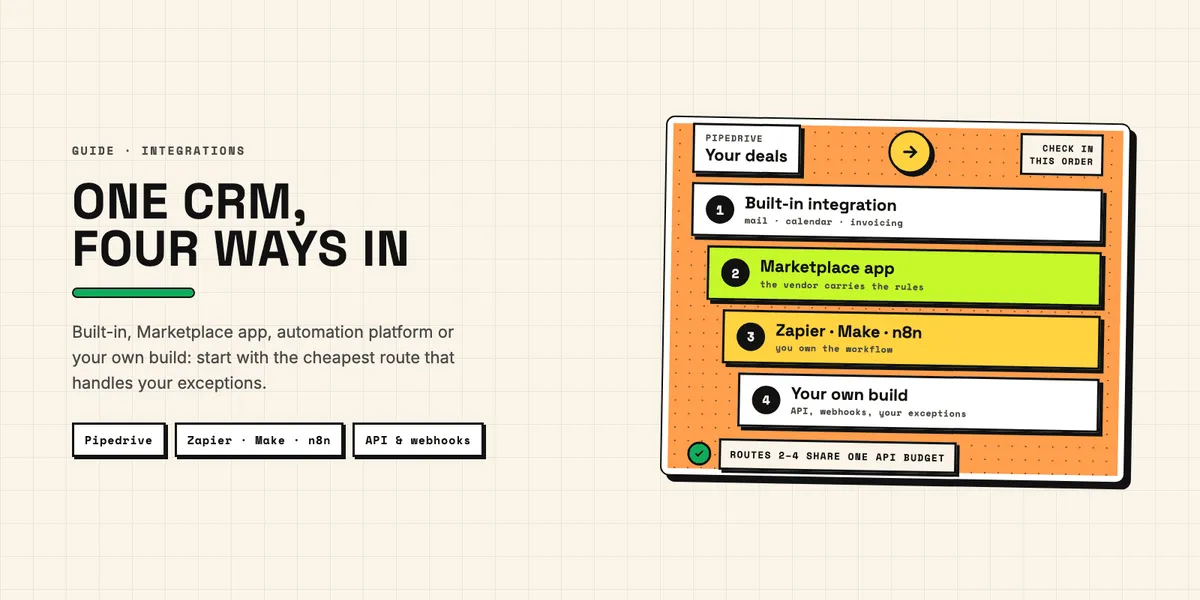
Pipedrive integrations come in four forms: the connections Pipedrive builds into the CRM itself, apps from the Pipedrive Marketplace, automation platforms such as Zapier, Make and n8n, and an integration you build yourself on the Pipedrive API and webhooks. All four can move the same deal into the same invoice. They differ in who writes the rules, who fixes them when the data does not fit, and where the running cost sits: in your Pipedrive plan, in a vendor subscription, in platform tasks, or in code you maintain.
This guide is the map for US sales, operations and development teams who want to connect Pipedrive to the rest of their stack. It explains each route, when it fits, and what changes when the other system is accounting software, a mailbox or a marketing tool, and it points to our detailed guide for each topic instead of repeating it. We build Pipedrive apps and custom integrations ourselves, so read our view on when to build with that in mind. If you are still deciding between CRMs, integration limits are part of how Pipedrive and HubSpot compare. The facts below come from the documentation of Pipedrive, the platform vendors, Intuit and Xero, checked on October 7, 2026; details are in the linked guides.
Which ways are there to connect Pipedrive to other tools?
Four, and the sensible order is to check them from the cheapest to the most flexible. Start with what Pipedrive already includes, then look for a Marketplace app, then a platform workflow, and build your own only when your rules outgrow the other three. Each step up buys control and costs upkeep.
| Route | Who builds and runs it | What you pay with | Fits when |
|---|---|---|---|
| Built-in integration | Pipedrive | your Pipedrive plan | the job is standard: mail, calendar, contacts, one invoicing tool |
| Marketplace app | the app vendor | the vendor's subscription | a vendor has already solved your exact job |
| Automation platform | you, without code | platform tasks or operations, plus Pipedrive API tokens | a short chain with few branches |
| Your own integration | you or a developer | development and maintenance, plus API tokens | rules that exist only in your company |
The table hides one thing all routes but the first share. Every app, platform workflow and custom script that talks to Pipedrive draws on the same daily API budget of your company account. A route is therefore never chosen in isolation: the third integration you add competes with the two you already run, and the symptom of a shortage is not an error on screen but a sync that quietly falls behind.
What does Pipedrive integrate with out of the box?
With your mailbox, your calendar, your address book, one invoicing tool and a set of in-app automations. Pipedrive's knowledge base groups its own integrations under Google integrations, contact sync, calendar sync, invoicing and WhatsApp, and lists Zapier and Marketplace integrations alongside them. The built-in ones need no Marketplace app, and for many teams they cover the daily work.
Email is the most consequential of these, because "connect Gmail" can mean three different mechanisms with very different privacy footprints. Full email sync is available from the Growth plan; Smart Bcc and the Gmail add-on work on every plan. Which one to switch on, and why the biggest is rarely the right default, is the subject of our guide to connecting Pipedrive and Gmail. Calendar sync is simpler. Pipedrive's calendar sync article supports Google, Exchange, Outlook and Office calendars and offers a two-way mode, in which "edits made in either calendar will update the linked event or activity in the other platform". Deletions travel too: with two-way sync, "deleting an activity in Pipedrive also deletes it from the external calendar".
Pipedrive automation is the built-in answer for jobs that start and end inside the CRM, such as creating a follow-up activity when a deal changes stage. According to Pipedrive's page on automation limits, "Automations is available on Growth and higher plans", with 50 active automations on Growth, 150 on Premium and 250 on Ultimate, and up to ten actions in each. Executions are capped as well: up to 10,000 per company within ten minutes. According to Pipedrive's overview of workflow automation, automations can also post to Slack, Microsoft Teams, Trello or Asana and send a webhook to an outside URL. Anything beyond a message, a card or an outgoing request, such as finding the matching customer in an accounting system or handling what that system answers, is where the next three routes begin.
When is a Pipedrive app from the Marketplace the right choice?
When a vendor has already built your exact job and you can accept its rules. A Pipedrive app installs in minutes, the vendor carries hosting and API changes, and the price is usually a subscription, though some apps are free, such as Pipedrive's own Mailchimp sync. The trade-off is that the app decides how your edge cases are handled, and the app page tells you only part of how.
The selection is large. Pipedrive's Marketplace overview advertises "400+ apps", while its integrations product page speaks of "over 500 out-of-the-box CRM integrations"; Pipedrive's own pages disagree on the number, so treat both as marketing figures. Quantity does not settle quality. Before installing, check what the app may read and write: users accept or reject its permission scopes as a whole, any user can install apps for themselves, and uninstalling revokes access without automatically deleting the vendor's copy of your data. Our checklist on vetting Pipedrive apps and add-ons walks through these questions, including what happens to custom fields an app leaves behind.
The other side of the Marketplace matters if you want to offer an integration to other Pipedrive users. A private app for your own company or one client needs no review; a public one goes through an approval that Pipedrive says can take up to 21 business days, and the developer hosts, supports and maintains it for as long as it is listed. We found no listing fee in Pipedrive's developer agreement. The budget sits in building and running the app, which our guide on getting an app into the Marketplace breaks down line by line.
How do Zapier, Make and n8n connect to Pipedrive?
Through ready-made Pipedrive modules that you chain into workflows without writing code. A Zapier Pipedrive workflow, a Make scenario and an n8n workflow look alike: a trigger in one system, a few actions in another. They differ in when the trigger fires, what each step costs, and how far the ready-made modules reach before you need raw API calls.
Zapier's Pipedrive integration page shows that not every trigger is instant. "New Deal", "Updated Deal" and "Updated Deal Stage" start a Zap instantly, while the filter-based triggers such as "Deal Matching Filter" are polling triggers, for which Zapier "checks for new data every 15 min on the Free plan". On that plan, a workflow that waits for deals entering a "won" filter can therefore lag by up to a quarter of an hour. On cost, Zapier's article on how task usage is measured says "a task is any successful action", and that "Zap triggers never use tasks". Each successful action step counts, so a Zap with one trigger and four actions that runs 200 times uses 800 tasks.
Make's Pipedrive CRM documentation adds two points every platform user should note. Make moved most of its Pipedrive modules to API v2, with leads and projects still on v1, and kept scenarios with the deprecated v1 modules running only until July 31, 2026, so existing scenarios had to be switched to the new modules. And options that fetch related records, such as the deal owner's details, "will require additional API calls", which "counts against your Pipedrive daily API limit". n8n's Pipedrive node covers activities, deals, files, leads, notes, organizations and persons, but for the product catalog it only lists retrieving all products; its "Deal Product" resource can add, update and remove products on a deal. For anything the node lacks, n8n points to its HTTP Request node, which is a direct API call with the stored credential.
That is the honest limit of the platform route: a no-code workflow stays no-code only while the modules cover the job. Once you add tax rules, retries and lookups, you are maintaining an integration, just in a different editor, and the person who built it becomes the only one who knows why a step exists. Document each workflow as you would document code.
When does an integration on the Pipedrive API pay off?
When the rules that decide your process exist only in your company. Think of a pricing rule that depends on the customer's history, a split of commission between two reps, an invoice layout your customers already know, or a field that releases a deal for billing. Few vendors will build a dozen such special cases for a single customer. Code you own can follow all of them, and that is what the extra effort pays for.
Two technical choices come first. A personal API token is fine for a script in your own account, but it carries one user's full rights and stops working when that user leaves; anything installed by others uses OAuth with declared scopes. And every request costs tokens. Since Pipedrive introduced token-based rate limits, requests "consume tokens from the company's daily budget", and once it is spent, further requests return error 429 "until the budget resets the next day". The newer API v2 costs fewer tokens per request than v1.
How large that budget is, and what a search, a list or an update costs, is worked out in what the Pipedrive API costs you, including the calculation that catches most first builds: a sync that searches for a contact before every write uses up its share far sooner than one that stores IDs. The same article covers the shapes an integration can take inside Pipedrive's interface, from a JSON panel on a deal to a custom iframe. One maintenance fact belongs in every budget: Pipedrive's v1 endpoints for deals, persons, organizations and other core records left support on August 1, 2026, so code written against them needs migrating. Your own build also needs a server, monitoring and someone who still knows the code when the next change comes; that work is the price of the control it buys.
What do webhooks add to a custom integration?
Speed without polling cost. A webhook makes Pipedrive push a message to your server when a deal, person or other record is created, changed or deleted, so your integration no longer has to ask every few minutes. Outgoing webhooks are not counted against the API rate limit, which makes them the cheapest way to notice a change.
The price is operational discipline. Pipedrive gives your endpoint ten seconds to reply and makes three more attempts. Ten failed first attempts put the webhook on a 30-minute ban, and events from that window are lost. Three days in a row without one good delivery, and Pipedrive removes it. A receiver that is down over a long weekend may come back to no webhook at all. The message is also deliberately thin: key fields, old values of what changed, and IDs of linked records, so the email address of a deal's contact still needs an API call.
Custom fields add a second layer. They appear under 40-character keys that differ for every Pipedrive account, so code that hard-codes a key works in one company only. Our developer guide to Pipedrive webhooks and custom fields covers the setup through the interface and the API, the v2 payload, idempotent handlers, and a pattern for releasing a deal for billing with a single option field.
What changes when you connect accounting software?
The other system starts following accounting rules that Pipedrive does not know. Tax, currency, customer names and deletions all behave differently on the books side, and an integration that ignores this works in the demo and fails on the first real invoice. The safest design gives every field exactly one owner: Pipedrive for the sales side, the accounting system for everything that touches the ledger.
QuickBooks Online is the only invoicing tool Pipedrive connects to natively. Its own app creates an invoice from the deal's Invoice tab and shows the payment status back on the deal, but someone has to click, and product changes are not kept in step. Third-party apps, platforms and custom builds can automate what the native app leaves to a click, and they all meet the same edges: QuickBooks calculates US sales tax itself where automated sales tax is set up, fixes a customer's currency once it is set, insists on unique customer names and does not let you delete a customer. Our guide to the Pipedrive QuickBooks integration maps these edges and their error messages. If you build against QuickBooks directly, read what the QuickBooks API costs first: writes are free, but reads are metered under Intuit's App Partner Program, and a retried request can create a second invoice.
Xero is a different story, because the native connection is gone. Pipedrive's own Xero integration let you create a Xero invoice from the deal view by hand and has been closed to new users since at least mid-2023, so today's options are Marketplace apps, platforms and custom builds. For a self-built app, Xero changed the economics on March 2, 2026: up to five connected organizations are free, though each may make only 1,000 API calls a day on that free tier, down from 5,000 before; from the sixth organization, or from more than 1,000 calls a day, the app moves to the paid Core tier at AUD 35 a month, which needs only a payment method, and per Xero's pricing table, certification is required from the Plus tier upward. What still works, and where tax codes and tracking categories break a sync, is in our article on the Pipedrive Xero integration in 2026.
Selling into Germany adds a format question. German business customers may ask a US supplier for XRechnung, the German e-invoice format, even where the law does not require it from a seller without a German establishment. None of the US billing tools we checked produced it out of the box. When the invoice data starts in Pipedrive, XRechnung for US companies explains which fields a German customer will ask for and how to produce the file.
What should a marketing tool integration get right?
Consent and deletion, more than field mapping, decide whether a marketing integration holds up. Moving contacts from Pipedrive to an email tool is technically easy; doing it so that only people who agreed to marketing email end up in the audience, and so that an erasure reaches both systems, is the part that needs a plan.
Mailchimp shows the pattern well. Pipedrive offers a free official sync app built as a set of flows, for example pushing a contact into a customer audience when a deal enters a chosen pipeline stage. It has documented limits: dropdown and other option fields do not sync, a changed email address creates a second Mailchimp contact, deletions are not mirrored, and opens, clicks and unsubscribes do not flow back into Pipedrive. Our look at the Pipedrive and Mailchimp sync explains each of these and how to drive the sync from a consent filter rather than from all contacts.
The same questions apply to any other marketing tool, whichever route connects it. Before you switch on a sync, decide which Pipedrive filter defines who may receive marketing email, how an unsubscribe on the marketing side reaches the CRM, and who checks that a deleted person is gone in both places. Those three answers matter more than which tool sends the email. If the marketing email is simple, Pipedrive's own Campaigns add-on is an alternative: it is native to Pipedrive and needs no sync at all.
What breaks Pipedrive integrations most often?
Rarely the connector itself. Most failures come from data and ownership problems that every route inherits, and they tend to stay silent until someone notices missing records weeks later. Four causes come up again and again, regardless of whether an app, a platform or your own code does the work:
- Duplicates in Pipedrive. A sync copies what it finds, so two records for the same contact become two customers or two subscribers on the other side.
- Two systems editing the same field. If both may change a billing address, the last write wins, sometimes with outdated data.
- A shared, exhausted API budget. Several integrations draw from one daily allowance, and the one that runs last gets nothing.
- Connections tied to one person. An app or API token set up under a personal account leaves with that person, and a webhook only reports the records its user may see.
Each has a cheap fix if applied before the first sync. Clean up duplicates first: our Duplicate Guard Lite flags duplicate people by email and company name so that someone decides which record is the real one; it reads only persons, so duplicate organizations still have to be merged in Pipedrive itself. Write down one owner per field. Count the API calls of every integration you run, not only the new one. And let integrations run under a dedicated Pipedrive user or a company-owned app installation rather than under the account of whoever set them up. After launch, one more habit helps: a scheduled check that webhooks still exist and that the last successful sync is recent catches silent failures early.
Which route should you start with?
The cheapest one that handles your exceptions. If a built-in integration does the job, use it. If a Marketplace app covers your process and its permissions fit, install it. If the job is a short chain such as "deal won, create customer, write the invoice number back", a Zapier, Make or n8n workflow will do. Build your own only when the rules are yours alone.
Two questions settle most cases faster than a feature comparison. How many exceptions does the process really have, counted honestly, including the ones handled today in someone's head? And who will maintain the integration in a year, when Pipedrive or the other vendor changes its API? A route nobody owns is the one that breaks, whichever it is. CRMBooster has no ready-made QuickBooks, Xero or webhook app, but we build custom integrations on the Pipedrive API. If your Pipedrive integrations have reached the point where none of the ready-made routes fits, describe which systems should connect and we will say which route we would choose.