Pipedrive Xero integration in 2026: what still works
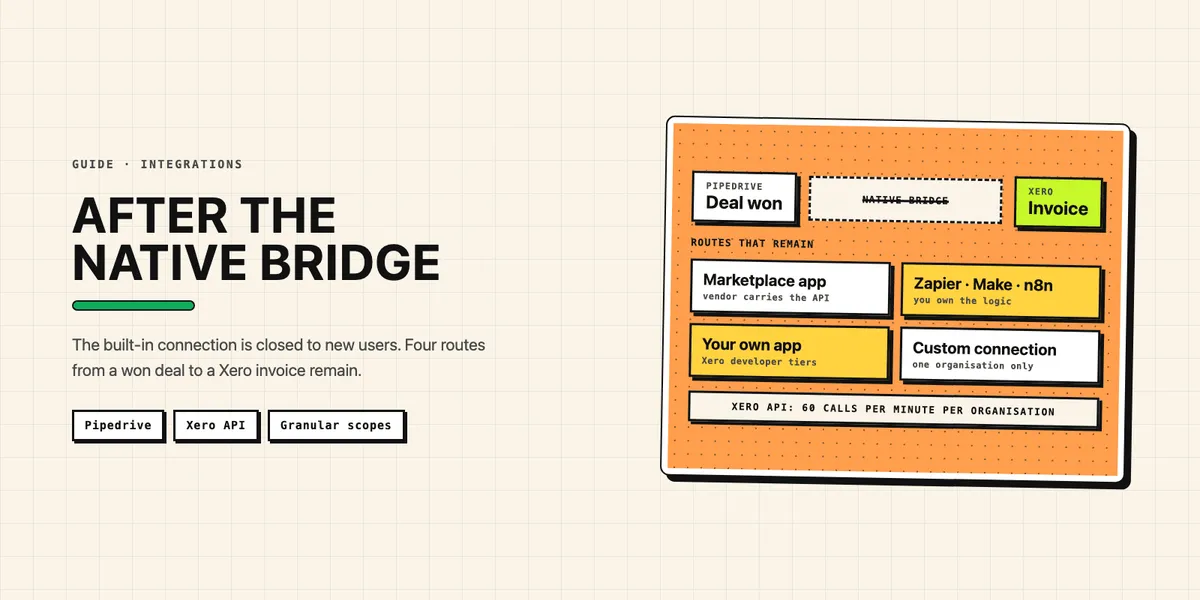
A Pipedrive Xero integration in 2026 no longer comes from Pipedrive itself. The native connection, which let you create a Xero invoice by hand from a deal's detail view, has been closed to new users since at least mid-2023, and Pipedrive's invoicing feature now works with QuickBooks only. What still works are third-party apps in the Pipedrive Marketplace, integration platforms such as Zapier, Make and n8n, and an integration you build yourself on the Xero API. That last route has a new cost threshold: since March 2, 2026, a self-built Xero app stays free only up to five connected organisations and 1,000 API calls per organisation a day, and needs a paid tier beyond either limit.
This guide is for sales and finance teams in the US, the UK, Australia and New Zealand who run Pipedrive and Xero side by side. It covers what happened to the native integration, what Xero changed for developers, which routes are left and where a sync usually breaks. Every fact about the two products comes from Pipedrive's or Xero's own documentation or from archived copies of it, checked on October 7, 2026. Where we could not confirm something, we say so.
Is there still a native Pipedrive Xero integration?
No, not for anyone setting it up today. Pipedrive's current help article on its invoicing feature, last updated September 3, 2026, says the feature "currently integrates with a popular invoicing tool" and then describes only QuickBooks; we walk through that path in our guide to the QuickBooks route in Pipedrive. Xero is not mentioned. The feature itself is included in all Pipedrive plans; the connected app may cost extra.
Pipedrive did once have its own Xero integration. An archived copy of its help article (snapshot of June 3, 2023, article dated April 11, 2023) opens with the note: "This Pipedrive integration is currently unavailable for new users." A snapshot from January 2023 does not have that note yet, and the most recent one, from January 15, 2025, still shows it; today the address returns a 404. Xero also removed the integration from its App Store, according to an April 2024 note on its own blog. Neither company states the reason, and we did not find an official one. Whether accounts that installed it before the cut-off can still use it, Pipedrive no longer documents.
What did the native integration do, and what replaces it?
It let a user create a Xero invoice by hand from the deal view and showed its status in Pipedrive. Nothing happened automatically when a deal was won: someone clicked "Create invoice" in the deal's detail view and filled in the invoice details. According to the archived help article, you mapped Pipedrive fields to the invoice recipient, address, email and customer tax ID, set a due date rule, and the invoice items filled themselves from the products on the deal. Each product had to be linked to an existing item in Xero, and each invoice to an existing or new Xero contact. Tax and currency were chosen per invoice.
That scope is a useful yardstick, because it is roughly what most teams still want: invoice drafted in Xero from deal data, payment status visible to sales, often with the extra wish that a won deal triggers it on its own. Since QuickBooks is now the only invoicing app Pipedrive supports itself, the same job for Xero falls to someone else. For Xero, there are four replacements, and they differ mostly in who carries the Xero API rules: an app vendor, a platform, or you.
What did Xero change for integrations in 2025 and 2026?
Three things: pricing, terms and permissions. On its developer pricing page, Xero announced it is "retiring our current revenue share model" for App Store apps and moving most apps to five tiers based on connections and data volume. The new terms applied to new developers from December 4, 2025; the tiers took effect on March 2, 2026. Starter is free with up to 5 connected organisations; Core costs AUD 35 a month for up to 50; Plus AUD 245 for up to 1,000; Advanced AUD 1,445 for up to 10,000; Enterprise is priced on application. Paid tiers include a monthly allowance of data read out of Xero, 10 GB on Core, and charge AUD 2.40 per additional GB. Sending data into Xero is unlimited on every tier.
The updated terms add "a new prohibition on using API data to train AI/ML models" and forbid bots or browser extensions that "simulate user actions." The third change concerns permissions. Xero's guide to OAuth scopes says broad scopes "are being replaced by granular scopes": accounting.transactions, for example, splits into separate scopes for invoices, payments, bank transactions and manual journals. Since March 2026, all web and PKCE apps have been assigned granular scopes, custom connections followed on April 29, 2026, and the broad scopes remain available until September 2027. Any integration still running on broad scopes has to be moved over before then.
Which ways to connect Pipedrive and Xero still work?
Four, and each one fits a different team. Ranked roughly from least to most effort:
- A third-party app from the Pipedrive Marketplace. Several vendors offer Xero apps that create invoices from deals and sync payment status back. It is the quickest to set up, usually against a monthly subscription, and the vendor carries the Xero tier, certification and API changes.
- An integration platform. Zapier, Make and n8n all connect to both systems. You build the workflow yourself, without code, but you own the logic.
- A Xero custom connection. Your own build, limited to exactly one Xero organisation, without a recurring user login.
- Your own app on the Xero API. Full control over several organisations, and the most work.
The Marketplace route is the shortest, but the quality of these apps varies. Before installing one, check what it reads and writes; our guide on how to vet a Marketplace app before installing it lists the questions. The platform route is flexible, but each platform's Xero connector covers a different set of objects. Platform connectors cover the common objects, such as contacts and invoices; anything beyond them needs raw HTTP requests against the API. Whichever platform you choose, every step that reads or writes Pipedrive spends from its daily API budget.
When does building your own Xero integration make sense?
When your process does not fit an app, and you connect only a handful of Xero organisations. A company integrating its own single organisation lands on Xero's free Starter tier, which allows 5 connections. The catch is the call limit, and it is new. Xero's API limits page sets 1,000 calls per day per organisation for Starter and 5,000 for higher tiers, plus 60 calls per minute and 5 concurrent calls; an app that needs more than 1,000 calls a day has to move to Core, even with a single organisation. Polling Xero once a minute for payment updates would take 1,440 calls a day on its own — above the Starter limit before a single invoice is created.
The connection threshold is new as well. Xero's old revenue-share model consisted, per the pricing page, of App Store subscriptions and commercial billing; a self-built integration used neither, so as we read it, it paid Xero nothing. And in July 2025 Xero's limits page still allowed uncertified apps "25 connections" and 5,000 calls a day, according to an archived copy (snapshot of July 9, 2025). Today the free tier stops at five organisations and 1,000 calls. A sixth connection requires a move to Core, for which "Your card details will be required", which means AUD 35 a month. App certification is listed only from Plus upward, the tier that also allows a Xero App Store listing; the higher tiers add a security assessment. A self-built app on Starter is therefore uncertified, and per Xero's pricing table so is one on Core, and the limits page allows each Xero organisation to connect at most five uncertified apps.
A custom connection works without a recurring user login: after a one-time authorisation through an emailed link, it uses client credentials and connects to one organisation only. It is available for Xero organisations in Australia, New Zealand, the UK and the US, the four markets this guide is written for, and it requires "an additional monthly subscription" that the organisation buys from Xero. Custom connections stay outside the new developer tiers. For a server-side sync between one Pipedrive account and one Xero file, it is often the cleanest option.
Where do Pipedrive–Xero syncs usually break?
At three places: tax, tracking categories and duplicate invoices. Tax comes first because Pipedrive stores a tax percentage on a product, while Xero's invoices API accepts a tax rate code per line, a TaxType that overrides the default tax code of the line's account. Codes differ by country — GST in Australia and New Zealand, VAT in the UK, sales tax in the US — so the mapping has to be maintained for each country you invoice in. Line amounts count as tax-exclusive unless you set LineAmountTypes.
Tracking categories are the second trap. Teams like to mirror a Pipedrive pipeline, region or owner into Xero reporting, but each line item can carry at most two tracking categories, and Xero's tracking categories documentation caps an organisation at two active ones in total. Plan which two dimensions finance actually needs before you map anything.
Duplicates are the third. If a request to create an invoice times out and your code retries, Xero may now hold the invoice twice. Xero's idempotency guide is the fix: send an Idempotency-Key header on every POST, PUT or PATCH, and a repeat with the same key returns the original response. Keys are stored for six minutes only, so they protect against a quick retry, not against a job that runs twice an hour apart. For that, store the Xero invoice ID on the Pipedrive deal and check it before you create anything.
How do you set up a Pipedrive Xero integration step by step?
Start with the data flow, not the tool. The steps are the same whether you configure a platform or write code:
- Decide the trigger. Usually "deal won" in Pipedrive. Decide whether Xero gets a draft for finance to approve or an authorised invoice.
- Match contacts. Look up the Xero contact by a stored ID before creating one; matching by name alone creates duplicates.
- Map products and tax. Link each Pipedrive product to a Xero item and each tax percentage to a Xero tax rate code, per country you sell in.
- Request narrow scopes. For an invoice sync,
accounting.invoices,accounting.contactsandaccounting.settings.read(for accounts, items, tax rates and tracking categories) are enough, plusoffline_accessfor a refresh token; a custom connection does not need it. Addaccounting.payments.readonly if you need individual payments rather than the paid amount on the invoice. - Write the Xero ID back. Store the invoice ID and number on the deal, so every later run can check it.
- Bring payments back by event, not by polling. Xero's webhooks fire when invoices and contacts are created or updated; Pipedrive's own webhooks for deal events start the flow on the other side.
One operational detail belongs in the plan from day one: the webhook endpoint has to answer within five seconds, and Xero disables a webhook after retrying failed deliveries for 24 hours; events from the retry period and while the webhook is disabled are kept for up to 31 days and replayed once the subscription is healthy again. When it disables a webhook, Xero emails the app's collaborators, so make sure someone reads that inbox. Otherwise payment updates stop arriving until someone re-enables the webhook, and after 31 days the backlog is gone; often nobody notices until finance asks why Pipedrive still shows an invoice as open.
Which route fits your Pipedrive and Xero setup?
It depends on volume and how unusual your process is. If you create a few invoices a week from standard deals, a Marketplace app is the pragmatic choice, even with its subscription fee; let the vendor carry Xero's tiers and scope changes. If you want a few specific automations and someone on the team enjoys building them, Zapier, Make or n8n will do, as long as you keep tax codes and duplicates in view. If Pipedrive drives multi-currency invoices, several Xero organisations or custom pricing logic, your own integration pays off — as long as you budget for the paid Xero tier once you pass five connected organisations or 1,000 calls a day per organisation.
Plan the Pipedrive side with the same care. Every route spends from the daily budget described in Pipedrive's token-based rate limits, and a Xero app you want to offer to other Pipedrive users also has to pass Pipedrive's Marketplace review. If you are weighing Xero against QuickBooks as the accounting backend, compare it with Intuit's metered App Partner Program: Xero meters data volume, Intuit meters read calls. CRMBooster has no ready-made Xero app, but we build custom integrations. If a native Pipedrive Xero integration is what you are missing, tell us which deal fields should reach Xero and we will tell you which route fits.