The Pipedrive API: what you can build, and what it costs you
Most gaps in a CRM look the same from the inside: a field that has to be filled by hand, a report nobody can produce, a document that gets rebuilt every week. Pipedrive answers all three the same way — through its API and its app extensions. What follows is what the platform actually gives you, where it stops, and how to work out in advance whether your idea fits inside the daily budget.
The short version: the Pipedrive API is generous on read access and unusually strict on how often you may ask. Most integrations that fail in production do not fail on features. They fail on a rate limit nobody costed.
What can you actually build inside Pipedrive?
Two different things, and it pays to keep them apart.
The first is a background integration: your service talks to Pipedrive over HTTP, reads deals, writes activities, listens to webhooks. The user never sees it. Every sync between Pipedrive and an accounting system works this way.
The second is a visible extension inside the Pipedrive interface. According to Pipedrive's app extensions documentation, these come in a fixed set of shapes:
| Extension | What it is | SDK required |
|---|---|---|
| Links | An app action that sends the user to an external page | no |
| JSON modals | A modal built from predefined components, filled by your app | no |
| JSON panels | A panel with predefined components in a detail view | no |
| Custom panels | Your own iframe in the sidebar of a deal, person or organization | yes |
| Custom modals | Your own iframe in a modal, opened from menus and links | yes |
| Custom floating window | A resizable, draggable iframe that survives navigation | yes |
| Custom UI for app settings | Your own iframe in the Settings area for your app | yes |
| Video calling and messaging extensions | A video or messaging service connected through a manifest | no |
The distinction matters for effort. JSON panels and modals are declarative: you describe components, Pipedrive renders them, and the result looks native because it is native. Custom UI extensions hand you an iframe and require Pipedrive's SDK — more freedom, more code, and a design you now own.
For a first version, the boring answer is usually right. A JSON panel that shows five fields and one button solves more problems than a custom iframe nobody has time to maintain.
How does authentication work?
Two mechanisms, and only one of them belongs in a product.
An API token is tied to a single user and can be copied out of that user's settings. It is the right tool for a script that runs in your own account. It is the wrong tool for anything another company installs, because the token carries that user's full permissions and dies with their account.
OAuth is the mechanism for anything distributed, and the one every app in the Pipedrive Marketplace is built on. Your app declares the scopes it needs, and the user approves them at install time. Pipedrive's scopes documentation lists them individually — deals:read and deals:full, contacts:read and contacts:full, activities, products, leads, projects, goals, mail, search:read, webhooks:full, and so on.
Two properties of that list decide how your install flow feels:
- Users accept or deny the whole set. There is no partial consent. Every scope you add is a scope someone can refuse over.
- Only the
adminscope requires administrator rights. Everything else installs for an ordinary user. If your app needsadmin— for pipelines, stages or user management — plan for the case where a non-admin starts the installation anyway, because the Marketplace does not stop them. Webhooks no longer need it: since January 2024, the changelog on the new webhook scopes listswebhooks:readandwebhooks:full, which let an app list, create and delete its own webhooks, and the current scopes reference lists both with these endpoints. The older page on webhooks for apps still names onlyadmin, so test once with a non-admin user thatwebhooks:fullis enough. Either way, a webhook only reports objects its user is allowed to see.
The practical consequence is to ask for less. An app that reads deals and writes activities needs deals:read and activities:full, not deals:full. The difference shows up on the consent screen, and consent screens are where installations are abandoned.
What does a request cost?
This is the part that surprises people, and it is the reason to read the numbers before writing code.
Pipedrive moved to token-based rate limiting: new signups from December 2nd, 2024, existing customers rolled out from March 1st, 2025 and finished by May 31st, 2025, according to the changelog entry. Every account now has a daily budget, and every call spends from it.
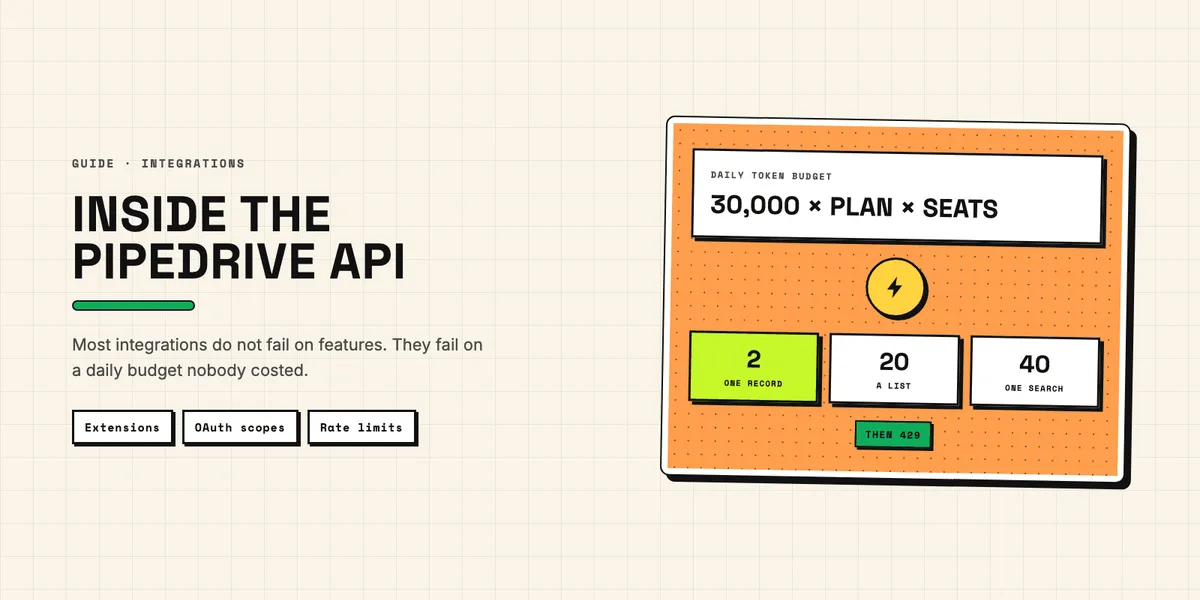
The budget is 30,000 base tokens × plan multiplier × number of seats, plus any purchased top-ups. The multipliers, per the rate limiting documentation, are Lite 1, Growth 2, Premium 5, Ultimate 7.
Requests are not equal. On the v2 endpoints, per the Deals API reference:
| Operation | Tokens |
|---|---|
| Get a single entity | 1 |
| Get a list of entities | 10 |
| Update a single entity | 5 |
| Delete a single entity | 3 |
| Search for entities | 20 |
Put those together and the planning question answers itself. A five-seat account on Growth has 30,000 × 2 × 5 = 300,000 tokens a day. A nightly job that searches for a matching person before every write — the most common pattern there is — spends 20 tokens per lookup, which caps you at 15,000 lookups a day for the entire company, before a single write. Cache the lookup, or the sync will hit a wall in month three and nobody will know why.
On top of the daily budget sits a burst limit measured in two-second windows: 20 requests for an API token on Lite, 40 on Growth, 100 on Premium, 120 on Ultimate. OAuth apps get four times that. Search is the exception — 10 requests per 2 seconds on every plan.
When either limit is hit, the API answers 429, and the daily budget only resets at midnight in the server's timezone. Read x-ratelimit-remaining to stay inside the two-second window; x-daily-requests-left is no gauge for the token budget, because it only counts POST and PUT requests made with an API token, on a UTC day. The daily budget itself is shown in the API Usage Dashboard in Company Settings, and Pipedrive emails company admins at 75 % and 100 %. A client that retries immediately on 429 makes its own situation worse.
On the old v1 endpoints, the same operations cost twice as much — and for the core objects there is no choice left anyway. The v1 endpoints for activities, deals, persons, organizations, products, pipelines, stages and search have been out of support since August 1st, 2026 and may be changed or removed without further notice. If you are starting today, start on v2; if you are still on v1, migrate now.
Where does the API stop?
Three limits are worth knowing before you promise anything.
It stops at user interface conventions you cannot override. Extensions live in the places Pipedrive defines — a sidebar panel, a modal, a floating window. You cannot replace the deal view or add a column to the pipeline.
It stops at rate limits shared across the whole company. Your integration competes for tokens with every other integration the customer has installed. An app that behaves well in a test account can starve in a busy one.
And it stops at fields nobody filled in. This is not a technical limit, but it ends more projects than the other two combined. An invoice needs a complete address, a per-line tax rate and, in cases such as intra-EU supplies, the customer's VAT ID. A CRM full of half-finished contacts cannot produce one, no matter how good the integration is. Cleaning up duplicates and missing fields before the build is not preparation for the project — quite often it is the project, and our Duplicate Guard Lite documentation covers the first half of that.
Build a Pipedrive API integration, or install something?
The honest test is not technical skill. It is how many special cases your process has.
A standard flow with few exceptions — new deal won, create a task, notify a channel — belongs in an automation platform or a ready-made app from the Pipedrive app catalog. You will be finished in an afternoon, and the running cost is a subscription rather than a maintenance obligation. What to check before you install one is a separate question — what the app may read, who in the team owns the connection, and what stays behind when it is removed.
Rules that only exist in your company — a discount logic, a commission split, a document layout your customers recognize — are where an own app earns its keep. You are not paying for the integration then; you are paying for the twelve exceptions no vendor will ever implement for you.
If you are weighing the two, the questions worth answering first before you scope a Pipedrive API integration are how many exceptions the process really has, who owns the data when both systems can write, and what the API budget allows at your plan and seat count. Those three decide the answer more reliably than any feature list — and if you would rather talk it through than guess, tell us what the process looks like.