Pipedrive apps and add-ons: how to choose one, and what installing it really means
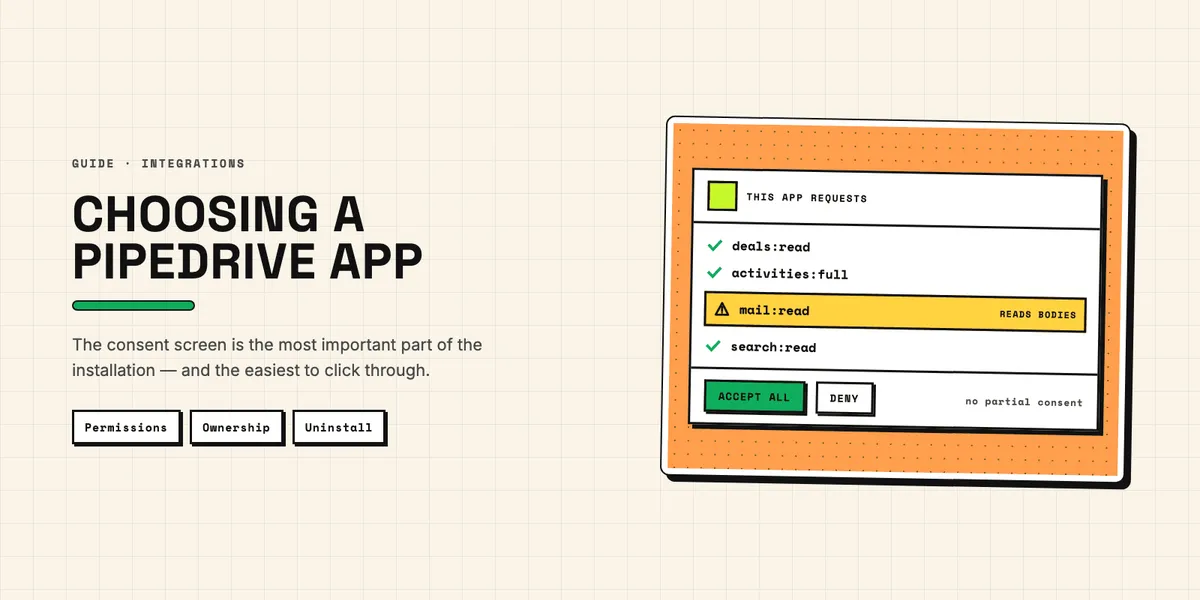
Every app in the Pipedrive Marketplace makes the same promise: install it, and a job you do by hand goes away. Most of them keep it. The interesting question is not whether an app works — it is what it can see, who in your team can turn it on, and what is left behind when you turn it off.
This is a checklist for the ten minutes before you click Install now, written for the person who will have to explain the decision later.
Where do apps come from, and who may install them?
Apps live in the Pipedrive app store — officially the Marketplace — and can be installed from there or from inside your Pipedrive account. Once installed, each one gets its own page under Tools and apps → Marketplace apps, which is also where you find its granted permissions, its settings, its user management and the uninstall button.
Two rules about who may do what surprise most teams:
The Marketplace does not stop ordinary users from installing apps. Anyone with a seat can add one. Only the admin scope requires administrator rights, and even then the installation flow can be started by someone without them.
Only a global admin can give an app to other users. Installing an app for yourself and rolling it out to the team are two different actions, and the second one is restricted.
Put together, that means the realistic default in a growing team is a handful of apps installed by individuals, each connected to a single person's account. That is fine until that person leaves. Before installing anything that carries a business process, decide whether it belongs to a person or to the company — and if it is the latter, have an admin install and share it.
What does the permissions list actually mean?
The consent screen is the most important part of the installation, and the easiest to click through.
Pipedrive's permissions are OAuth scopes, and its scopes documentation spells out what each one grants. The pattern to look for is :read versus :full:
| Scope | What the app may do |
|---|---|
deals:read |
Read deals, their fields, products, notes and files |
deals:full |
Everything above, plus create, modify and delete deals |
contacts:read |
Read people and organizations, their fields and followers |
contacts:full |
Everything above, plus create, modify and delete contacts |
mail:read |
Read mail threads and messages |
search:read |
Search deals, persons, organizations, files and products |
admin |
Pipelines, stages, webhooks and user management — admin rights required |
Two things follow from that list.
First, you accept or deny the whole set. There is no way to grant an app read access to deals while withholding contacts. If the combination is wrong, the only lever you have is not installing it.
Second, mail:read deserves a pause. An app with that scope can read the message bodies in your synced mailbox — not just who wrote to whom. That may be exactly the point for an email tool, and entirely unnecessary for a reporting add-on. When a scope does not match what the app is advertised to do, that mismatch is the finding, and asking the vendor why is a reasonable thing to do.
Five questions to ask before installing from the Pipedrive app store
Does the app do the work, or just move it? An add-on that shows a button and opens an external page has not automated anything; it has added a click. That is not automatically bad — but price it as a shortcut, not as automation.
Where does the data go? Every app with :read scopes is a place your customer data can be copied to. That makes the vendor a processor in the GDPR sense, with everything that follows: a data processing agreement, an entry in your record of processing activities, and an answer to where the servers stand. For a two-person add-on this is quick. It is not optional.
What happens under load? Every installed app spends from the same daily API budget your account has — 30,000 base tokens × plan multiplier × seats, per Pipedrive's rate limiting documentation. Several chatty apps in a busy account can starve each other, and the symptom is not an error message but a sync that silently falls behind. The mechanics are in our piece on what the Pipedrive API costs you.
Who owns the connection? See above: an app installed on a personal account leaves with that account.
What does it cost when it works? Pricing is set by the vendor, not by Pipedrive, and is commonly charged per user per month. An app that is free for three users and billed for twenty is a different decision than the trial suggested.
What happens when you uninstall?
Uninstalling is done from Settings → Tools and apps → Marketplace apps, through the three-dot menu next to the app.
What that does is revoke the app's access to your Pipedrive account. What it does not automatically do is delete the copy of your data on the vendor's side. Those are separate acts, and only the first one is under your control from inside Pipedrive. If the app held personal data — contacts, email content, call recordings — deletion is a request you make to the vendor, and one you should be able to evidence afterwards.
Two side effects are worth planning for. Custom fields an app created do not necessarily disappear with it, and an orphaned field is worse than no field: if the app filled a "lead score", that field keeps its last value forever and slowly becomes a lie. And any automation that referenced the app stops without warning. Before uninstalling something that ran for months, note which fields it wrote and decide whether to clear them, keep them as a snapshot, or rename them so nobody trusts them by accident.
Choosing between an app, a platform and your own build
Three routes lead to the same outcome, and they differ mostly in who carries the exceptions.
| Route | Setup | Running cost | Fits when |
|---|---|---|---|
| Marketplace app | minutes to hours | subscription per user | the process is standard |
| Automation platform | hours | per task or per month | few cases, low volume |
| Your own app | days to weeks | maintenance instead of licence | many exceptions, own logic |
The deciding question is not price. It is how many special cases your process has. A vendor builds for the common path; the exceptions are yours to carry either way — the only choice is whether you carry them in a workaround or in code. Our app catalog shows what we cover ourselves, and what a build looks like explains the other route.
One last piece of hygiene, unglamorous and worth more than most add-ons: apps read the data you already have. Duplicated contacts get processed twice, and half-filled records fail silently in whatever the app produces. Cleaning that up first makes every subsequent installation work better — which is why Duplicate Guard Lite is free.