The Pipedrive Marketplace: how apps get there and what building one costs
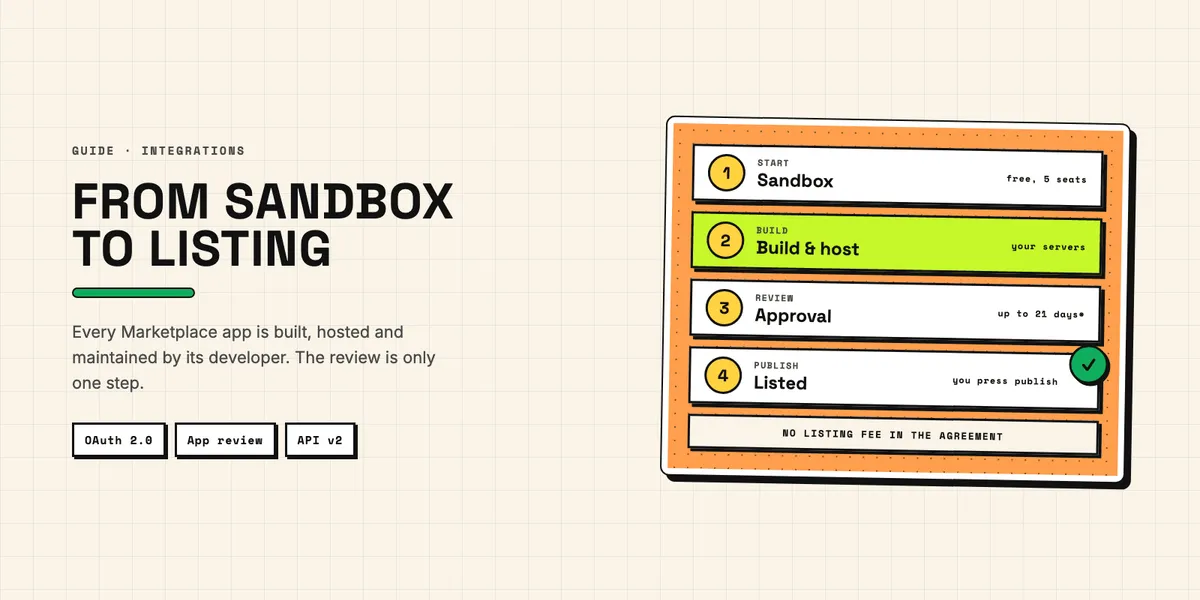
The Pipedrive Marketplace lists more than 400 apps, and every third-party app in it got there the same way: built against Pipedrive's API with OAuth 2.0, hosted by its developer, and approved in a review that Pipedrive currently says can take up to 21 business days. Listing is not the expensive part — the Pipedrive Developer Agreement contains no listing fee. The cost sits in building the app, running it, and keeping it working while the API underneath it changes.
This article walks through that path from the builder's side: the two kinds of apps and which one the contract allows for your case, what the review checks, which technical rules drive the budget, and what we could and could not find out about money. If you are on the other side, deciding whether to install an app, our guide to Pipedrive apps and add-ons covers permissions, admin rights and uninstalling. All sources below were checked on September 22, 2026.
What is in the Pipedrive Marketplace?
The Marketplace overview advertises "400+ apps available for your revenue lifecycle", grouped by stages such as getting more leads, managing contracts, payments and projects. Before you build, look at the stage your app belongs to: a crowded shelf changes what your listing has to promise. Not every listing comes from an outside developer, either — the Mailchimp sync app, for instance, is built by Pipedrive together with an integration partner, as we describe in our look at the Pipedrive and Mailchimp integration.
Installing an app always runs through an OAuth consent screen that lists the permission scopes, and users can only accept or reject them as a whole. Non-admins can install apps for themselves, so an app that requests admin-level scopes has to cope with a user who lacks those rights. Only a global admin can enable an app for other users in the company.
Which kind of Pipedrive app does your case allow?
Pipedrive offers two app types, and the choice is not only technical. The Developer Hub calls them public and private; the Pipedrive Developer Agreement calls a public app a Marketplace app. It defines a private app as one built "for non-commercial use, including internal use by Developer or use by specific clients or partners without broader commercial distribution". An app "for commercial distribution, whether listed on the Marketplace or distributed through other channels" counts as a Marketplace app and is subject to Pipedrive's approval process.
In practice: a private app fits an integration for your own company or for a specific client. According to the approval documentation, it is shared through a direct installation link instead of a Marketplace listing, and submitting it for review is unnecessary if it is only used internally. An app you sell to customers needs approval even if you never list it publicly. After approval, a public app stays unlisted until you publish it yourself in the Developer Hub. The type cannot be changed once the app is created, so switching later means registering a new app.
Development starts in a free developer sandbox account. It is limited to five seats by default and is deleted if no app is created within 45 days, or if no public app is published and no private app made live within six months of sign-up. Plan the first build so that the sandbox does not expire halfway through.
What does an app look like inside Pipedrive?
An app can be purely a background integration, but most visible apps use app extensions. The extension documentation lists app actions (buttons that open a link or a modal), JSON panels (structured data shown on a deal, person or organization), custom UI extensions (your own web page embedded in an iframe) and manifest-based extensions for video calling and messaging.
Each type carries hard limits that shape the design. A JSON panel must answer within ten seconds, or Pipedrive shows "Something went wrong" instead; an app can have one panel per detail view, three in total. Everything behind those panels runs on infrastructure you provide: the agreement makes the developer "solely responsible" for the development, operation, maintenance and security of the app.
How does an app get approved?
By passing a review of the install flow, the OAuth implementation, the extensions and the listing itself. According to the approval process documentation, reviews "may take up to 21 business days", which Pipedrive attributes to "a surge in demand and ongoing vacations". Reviewers check that installing and uninstalling works, that access tokens are refreshed when their 60-minute lifetime ends, that the app never collects or stores a user's personal API token, that it respects rate limits, that it uses version 2 webhooks where possible and that extensions load without errors.
The submission needs more paperwork than most developers expect: a terms-of-service page, a privacy policy, a separate pricing page, step-by-step installation instructions, a demo video explaining why each requested scope is needed, working test accounts for the reviewers and a reachable support contact. The listing has its own rules; according to the registration guide, the short description may have at most 150 characters and images use a 16:10 format. The form requires only one image (up to five), but the review checklist asks for three to five.
The 21 days are not a guarantee. When we read through the official developer forum, several 2026 threads complained about slow reviews without feedback. In one, a developer reported in July 2026: "We're now ~35 business days in, past the stated 21-business-day maximum, and haven't received any reviewer feedback". That thread is a single case, but it is reason enough not to tie a launch date to the review.
Which technical rules drive the cost?
Three: the rate limits, the move from API v1 to v2, and the data you are responsible for. All three create work that does not stop when the app goes live.
Rate limits are counted in tokens per company per day: 30,000 base tokens times a plan multiplier times the number of seats, plus any purchased top-ups. At 100 percent, requests fail with error 429 until the budget resets. Because the budget belongs to the customer's company and is shared by every app they run, a wasteful app hurts the customer's other integrations too. We explain the formula, the multipliers and what individual requests cost in what you can build with the Pipedrive API; in short, the newer v2 endpoints cost fewer tokens per request.
The API itself is in transition. Pipedrive announced in April 2025 that v1 endpoints for activities, deals, persons, organizations, products, pipelines, stages and search would only be guaranteed until December 31, 2025; since August 1, 2026 they are out of support. They may still respond, but without any guarantee. For webhooks, Pipedrive said in December 2024 that v1 would be "deprecated completely in 2026"; by September 2026 no date had been set. An app that still calls the old v1 endpoints needs rework. Pipedrive gave eight months' notice before the guarantee ended, and the endpoints kept running for another seven months until support formally ended — but the agreement leaves no doubt about who does the work: after Pipedrive changes its development materials, the developer "shall remain solely responsible for ensuring that the App functions properly".
Finally, data protection is your job. When a user uninstalls, Pipedrive sends a DELETE request to your callback URL, and how you handle the data you stored is up to you, within the law. Every app must disclose how it uses client data and get the client's express consent; a Marketplace app must also keep an up-to-date privacy policy.
What does building a Pipedrive Marketplace app cost?
We found no charges from Pipedrive: the sandbox is free, and the Developer Agreement contains no listing fee, commission or revenue share. Pipedrive can change the agreement, though; changes take effect 30 days after they are posted. We also found no Pipedrive billing option for third-party apps — the review checklist asks for a link to your own pricing page instead.
The development cost itself is not published anywhere we looked; no agency or Pipedrive partner states a price range for Marketplace apps. The closest public benchmark is general, not Pipedrive-specific: a vendor of OAuth tooling estimates roughly 150 engineering hours for the OAuth plumbing of one integration alone — app registration, token storage and refresh, reconnect flow and settings — and around 300 hours a year to maintain it. That excludes the app's actual features, and it comes from a vendor that sells a replacement for exactly that work. Pipedrive covers part of that work itself: its create-pipedrive-app tool generates the OAuth flow, including token exchange and refresh, and the SDK scaffolding for extensions. Encryption, revoked-access handling and a settings page remain yours, so treat that figure as likely on the high side for that part, not as a quote. What the rules above tell you more reliably is where the money goes:
| Cost item | Why it exists | One-off or recurring |
|---|---|---|
| Build: OAuth, API logic, extensions | Required for every app | One-off |
| Review preparation: video, test accounts, legal and pricing pages | Required for approval | One-off, repeated for material changes to a published app |
| Hosting and monitoring | Pipedrive does not host apps | Recurring |
| API migrations (v1 to v2, webhooks v2) | Pipedrive changes the platform | Recurring |
| Support, client contract and insurance | Required by the agreement | Recurring |
| Data handling on uninstall, consent and privacy policy | Required by law and the agreement | Recurring |
The recurring rows are the ones that get underestimated. The agreement asks for support at the level of a typical SaaS provider, a binding contract with every client and insurance for the term and two years after. An app that is cheap to build but has no one to maintain it is the one that breaks at the next API change.
Should you build a Marketplace app at all?
Only if you want to distribute it commercially. For your own company or a specific client, a private app does the job without the review, the listing work and the waiting time. As soon as you sell the app to customers, the agreement treats it as a Marketplace app, whether you list it or not.
A published Marketplace app also binds you to rules that outlast the launch. Every material change, from an enhancement to a new version, goes through approval again. You must give Pipedrive and all customers at least 30 days' written notice before such a change, before changing your client contract or privacy policy, and before removing the app. Pipedrive, in turn, decides at its discretion which apps are published or remain in the Marketplace, even after an app has been approved. That is the trade-off for the sales channel: customers browsing a stage of their sales process can find you, and in return you work within Pipedrive's release rules. Hosting, migrations and data protection come with every Pipedrive app, public or private — as do support, a client contract and insurance under the agreement. If you are weighing whether an app for your use case is worth building, tell us what it should do and we will say which route fits.