Xero API for developers: OAuth 2.0, tenants, limits and what the docs skip
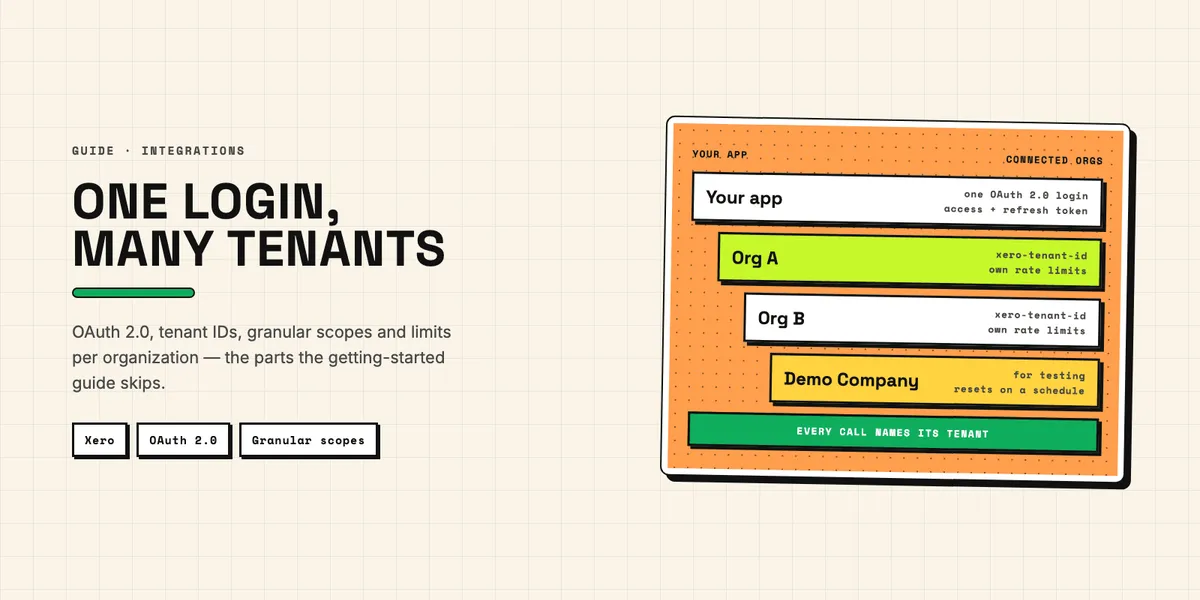
The Xero API is a family of REST APIs behind one OAuth 2.0 login: Accounting, Payroll, Files, Assets and Projects. Most CRM and app integrations need only the Accounting API. A first test call is the easy part; the harder parts come later. Access tokens expire after 30 minutes. Every data request has to name a tenant. The free Starter tier stops at five connected organizations and 1,000 calls a day per organization. And apps created since March 2, 2026 use a new set of granular scopes that older tutorials do not show.
This guide is for developers and technical buyers who are about to build on the Xero API. Every number below comes from Xero's own developer documentation, help center or pricing pages as of October 12, 2026, or is calculated from it. Where two official pages disagree, we name both. If you are a Pipedrive user and mainly want to know whether you need to build at all, start with our overview of which Pipedrive–Xero routes still work. It also covers the invoice-level traps: tax codes, tracking categories and duplicate invoices.
Which app type should you register on the Xero developer portal?
For a product that many customers will connect, register a web app with the "Auth Code" grant type. Choose "Auth Code with PKCE" for desktop and mobile apps that cannot keep a client secret. Choose a custom connection only when you integrate exactly one Xero organization, typically your own company or a single client. Pick deliberately, because each type uses a different OAuth flow and different credentials.
| App type | OAuth flow | Organizations | Who pays Xero |
|---|---|---|---|
| Web app | Authorization code with client secret | Many, limited by your tier | You, from the sixth connection |
| Mobile or desktop app | Authorization code with PKCE, no secret | Many, limited by your tier | You, from the sixth connection |
| Custom connection | Client credentials | Exactly one | The customer, as a monthly subscription |
Single-page apps are not supported by the PKCE flow, Xero says, so a browser-only client still needs a backend. For development, the free demo company comes with sample data and can be connected like any real organization. It resets automatically 28 days after creation, and Xero's development accounts page warns that you then have to reconnect your app. Build that reconnect into your test routine, or your tests will fail monthly for no visible reason.
How does Xero OAuth2 work, and how long do tokens last?
Xero OAuth2 follows the standard authorization code flow, with short lifetimes. According to the code flow guide, the authorization code expires five minutes after issue, an access token lasts 30 minutes and a refresh token 60 days. You only get a refresh token if you request the offline_access scope. Xero's certification checklist makes that scope mandatory for certified apps.
The refresh token rotates. Every refresh returns a new access token and a new refresh token, and Xero says plainly: "You must save both tokens in order to maintain api access." If your app never gets the response or fails to save it, the old refresh token still works for a grace period of 30 minutes. After that it expires, and the user has to authorize your app again. So store the new refresh token before anything else can fail, and let only one process refresh a given connection at a time. PKCE apps refresh differently: per the PKCE flow guide, the request carries no authorization header and sends client_id in the body next to the refresh token. Xero's token types guide says otherwise: it asks PKCE apps for a Basic header built from the client ID plus a trailing colon on refresh as well. Test the refresh against the demo company before you rely on either page.
What is a tenant, and why does every call need one?
A tenant is the Xero organization, practice or Practice Manager account that a user connected to your app. One access token can cover several tenants, so the token alone does not tell Xero which company you mean. Every Accounting API request needs two headers: Authorization with the bearer token and xero-tenant-id with the tenant's ID. You get that ID from GET https://api.xero.com/connections.
Call the connections endpoint right after the OAuth flow. To find only the ones authorized in the current flow, filter by the authentication_event_id from the decoded access token. The tenants guide also explains how connections are counted against your tier: one per unique tenant, not per user. Connections "stay active indefinitely" even when you make no calls. They end only when someone disconnects, revokes or deletes them, when the authorizing user loses access, when the tenant is deleted, or when you delete the app in the Developer Centre.
That has a cost side. A trial customer who never disconnects keeps using one of your five free slots. To remove a connection, send DELETE /connections/{connectionId}. Use the connection id, not the tenantId. Removing a connection does not invalidate your tokens, and revoking a refresh token removes all of that user's connections. Xero's certification checklist requires a visible disconnect button and says you must not rely on expired tokens to end a connection.
Which scopes should you request now that Xero has granular scopes?
Request the narrowest granular scopes that fit the job. Apps created on or after March 2, 2026 receive the new granular scopes automatically. Older apps have been able to request them since spring 2026, but may keep broad scopes such as accounting.transactions until September 2027. A tutorial that asks for accounting.transactions was written for the old model. Today that access is split into scopes for invoices, payments, bank transactions and manual journals.
Three rules from the granular scopes FAQ matter in practice. Existing tokens are not upgraded silently: a customer has to go through the consent screen again. If you call an endpoint without the right scope, the API returns a 401 error with the header WWW-Authenticate: insufficient_scope. It does not say which scope is missing. Xero recommends catching that case and asking the user to update permissions. And scopes are additive: a new authorization adds to what a connection already has. If you need the user to authorize again, Xero suggests removing the connection so the user reconnects. Start narrow. For a typical CRM invoice sync, our Pipedrive–Xero guide lists the exact set.
One scope promises more than it delivers. accounting.journals.read is on the scope list, but the Journals endpoint behind it is a premium feature for the Advanced tier and above. It needs a security assessment and use-case approval. New custom connections no longer get the scope at all. Manual journals are a different endpoint and remain available on every tier.
What do the Xero API rate limits mean in practice?
Per connected organization, you get 5 concurrent calls, 60 calls a minute and 1,000 calls a day on Starter, or 5,000 on any paid tier. Across all organizations, your app can make 10,000 calls a minute. That is how Xero's limits page puts it. Every response carries the remaining budget in X-DayLimit-Remaining, X-MinLimit-Remaining and X-AppMinLimit-Remaining.
Exceed a limit and you get HTTP 429 with an X-Rate-Limit-Problem header naming the limit. For the minute and day limits, a Retry-After header tells you how many seconds to wait. The windows are fixed and reset at different times for each tenant, so a single global backoff timer is wrong. A worker pool sending ten parallel requests to one organization hits the concurrency limit even with the daily budget untouched.
A worked example shows why the daily limit drives your design. Suppose an initial sync has to load 12,000 invoices with line items. Fetched one by one, that is 12,000 calls: twelve days on Starter, 2.4 days on Core, and at least 200 minutes even at the full 60 calls a minute. Certified apps from Plus upward get Rapid Sync, which lifts the standard limits for the first 30 minutes of a new connection. Fetched in pages, it is 12 calls at the maximum of 1,000 per page, or 120 at the default of 100. Separately, the limits page says organizations on Xero's "Early" plan, a US plan, can approve only 20 sales invoices and 5 bills a month. Xero's US plan page adds that approving and sending both count, and that transactions created by apps can count too. The cheapest UK plan, Ignite, also allows 20 invoices, with 10 bills. Above the cap, the API answers with a 400 validation error, which can look like a bug in your code.
How do you read data without burning calls and egress?
Use pages, filters and change dates instead of single-record lookups. The requests and responses guide lists paging for invoices, contacts, credit notes, bank transactions, manual journals, payments, purchase orders, prepayments and overpayments. The default page size is 100, the maximum 1,000, and paged results include line items. Filters such as IDs= and ContactIDs= take comma-separated lists, so one call can replace dozens.
For incremental syncs, Xero recommends the If-Modified-Since header. The same page says what can go wrong: "Not all changes will trigger a change of the UpdatedDateUTC field." Its examples include a new due date on a partly paid invoice and contact balances. A sync that relies only on change dates will therefore miss some edits. Plan a periodic full comparison for the fields that matter to you. Two format surprises sit on the same page. The Accounting API answers in XML unless you send Accept: application/json. And JSON dates come in an old .NET format, /Date(1439434356790)/, in milliseconds.
Writes have a trap of their own. If you send several invoices with summarizeErrors=false, each one comes back with its own status. A validation error then arrives inside an HTTP 200, not a 400. Check every item's status and log the warnings. On paid tiers, reading also counts against your monthly egress allowance, the data volume you pull out of Xero. Sending data into Xero is unlimited on every tier.
How do Xero webhooks work, and what do they leave out?
Xero webhooks are set up once per app and deliver events for every connected organization. You choose event categories, give an HTTPS URL, and pass a validation called "intent to receive". According to the webhooks overview, Xero signs each payload with HMAC-SHA256 using your webhook key and sends the base64 result in x-xero-signature. Your endpoint must answer 2xx for correctly signed payloads and 401 for all others.
Compute the signature over the raw body; a framework that parses the JSON first makes valid signatures look wrong. The bigger limitation is coverage. The available categories are contacts, credit notes, invoices, overpayments, prepayments and App Store subscriptions. Payments have no category of their own. A payment changes the invoice's paid amount, so the invoice update event can cover it; test that against the demo company before you rely on it. Bank transactions and items have no events at all and have to be polled. Each event carries mainly IDs: the resource ID, the tenant ID, the event type and a resource URL. To learn what changed, you make a GET call, and that call counts against the same limits and egress as any other.
The delivery rules, including the five-second response window and the 24-hour retry period, are covered in our Pipedrive–Xero guide. On the CRM side, Pipedrive webhooks and custom fields work differently: they send the record's key fields and related IDs in data and the old values of changed fields in previous, which saves some follow-up reads. They authenticate with Basic Auth rather than a payload signature, though, so Xero's HMAC check gives better protection against forged requests.
What does building on the Xero API cost a developer in 2026?
Nothing up to five connected organizations, and a flat monthly fee from the sixth. Since March 2, 2026, Xero's developer pricing has had five tiers based on connections and data egress. All amounts are in Australian dollars and exclude tax.
| Tier | Monthly fee | Connections | Calls per day per org | Egress included | Requirements and extras |
|---|---|---|---|---|---|
| Starter | none | 5 | 1,000 | – | default for new apps |
| Core | AUD 35 | 50 | 5,000 | 10 GB | credit card |
| Plus | AUD 245 | 1,000 | 5,000 | 50 GB | certification, Rapid Sync, optional App Store listing |
| Advanced | AUD 1,445 | 10,000 | 5,000 | 250 GB | certification, security assessment, Journals endpoint |
| Enterprise | on application | no limit | 5,000 | on application | certification, security assessment, App Store listing required |
The pricing FAQ fills in the mechanics. Adding a sixth connection requires a credit card, the only payment method Xero accepts, and moves you to Core. Beyond Core, connections are "capped at the tier maximums" until you meet the next tier's requirements. Your 51st customer cannot connect until you are certified. Extra egress costs AUD 2.40 per GB on Core, Plus and Advanced, and a "GB" is technically a gibibyte. The organisation endpoint does not count. Custom connections stay outside this model; the customer pays Xero a monthly fee for each one. And per the limits page, each Xero organization can connect at most five uncertified apps. Xero's updated terms, in force for all developers since March 2, 2026, also forbid using API data to train AI or machine learning models.
Where do the Xero API docs contradict themselves?
In at least five places when we compared the pages on October 12, 2026. Most predate the 2026 pricing change, but each can mislead an estimate:
- Connection limit and cost. Xero's help article on custom integrations lists web and mobile apps as "Free" and able to connect "with up to 25 Xero organisations". The pricing page allows 5 free connections and charges AUD 35 a month from the sixth.
- Custom connection regions. The same help article first lists the United States as eligible and later names only Australia, New Zealand and the UK. The developer docs include the US.
- Certification. The pricing table requires certification from Plus upward. A heading in the pricing FAQ speaks of certification for "Core, Plus, Advanced, and Enterprise".
- Page size. The limits page describes fetching line items "for 100 invoices at a time". The requests guide allows pages of up to 1,000.
- "Starter". The limits page puts the 20-invoice cap of the customer's "Early" plan under a heading called "Starter plan", the same name as the free developer tier.
When pages disagree, trust the pricing page and the topic guide, and test against the demo company before you promise a number.
Should you build directly on the Xero API?
Yes, if you support Xero alone or alongside one other accounting system and your process needs logic that no ready-made app offers. The Xero API documentation is thorough, the free tier covers a prototype, and AUD 35 a month for Core is small next to development time, up to 50 customers. From the 51st you need Plus at AUD 245 a month plus certification, and egress beyond the allowance costs AUD 2.40 per GB. The real cost is upkeep. In 2026 alone Xero changed its pricing, its terms and its scope model, and token rotation, tenant handling and rate limits remain your code to maintain for as long as the integration runs. If that upkeep is not worth it, a ready-made Marketplace app or an automation platform carries these rules for you.
Supporting QuickBooks as well? Its developer program bills differently, by metered read calls rather than data volume; our article on the QuickBooks API and its paid tiers walks through it. For the broader decision between apps, platforms and custom code, our overview of Pipedrive integration routes helps. Building against Pipedrive on the CRM side? Its token-based limits are explained in what you can build with the Pipedrive API. CRMBooster does not sell a Xero product; what we know comes from building Pipedrive connections to accounting software. If a Xero project is on your desk, describe the data you need to move and we will outline the tier and design we would expect.